
After a successful Bit Redirect payment, the thank-you page is displayed to complete the customer flow.
It is needed because the display may change when the payment starts in a mobile browser and continues in the Bit app. The customer starts in the browser, moves to Bit, and completes the payment in the app.
After approval, Grow opens the thank-you page based on the selected option: Original Page, Original Browser, or New Tab.
This flow is unique because browser type, including in-app browsers like Facebook or Instagram, can affect how the thank-you page appears.
Mobile redirect behavior
Because Bit opens an external application, the return flow may be affected by the browser from which the payment was originally started.
If the payment starts from the device’s default browser, the customer can usually return to the expected browser flow.
If the payment starts from a non-default browser, such as Facebook, Instagram, or another in-app browser, the customer may be redirected back through the device’s default browser instead of the browser where the payment process started.
This behavior depends on the mobile device, operating system, browser settings, and app behavior.
Redirect options
Grow supports three redirect options after a successful Bit payment:
- Back to the Original Page
- Back to Original Browser
- Open in a New Tab
1. Back to the Original Page
This option is intended for cases where it is important for the customer to return to the exact original page where the Bit payment process was initiated.
When the payment starts from the default browser
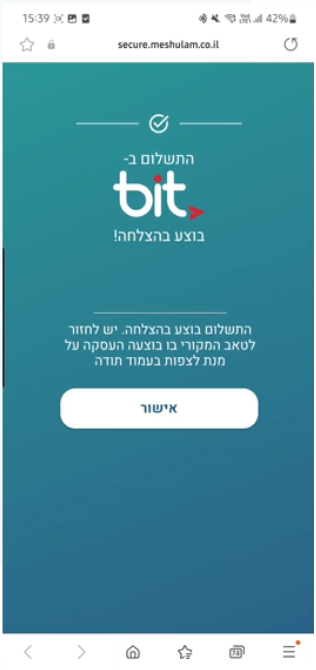
If the Bit payment flow was initiated from the device’s default browser, a confirmation page will open after the payment is completed successfully.
The thank-you page opens in a new tab in the same browser from which the customer started the payment process.
When the customer clicks the confirmation button, the new tab closes automatically and the customer is returned to the original page where the payment process was initiated.
When the payment starts from a non-default browser
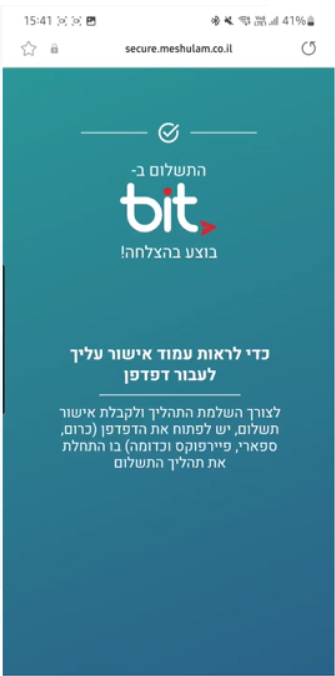
If the Bit payment flow was initiated from a non-default browser, such as Facebook, Instagram, or another in-app browser, the thank-you page may open in the device’s default browser instead of the browser where the payment started.
In this case, the customer will see an instruction page explaining that, in order to view the payment confirmation, they need to return to the page where the payment process was originally started.
At this stage, the action depends on the customer. The customer may return to the original page, switch back to the original browser, or close this page.
2. Back to Original Browser
This option is intended for cases where it is important for the customer to return to the same browser where the Bit payment process started, but not necessarily to the exact original tab.
When the payment starts from the default browser
If the Bit payment flow was initiated from the device’s default browser, the customer will return to the default browser after completing the payment.
In this case, a standard thank-you page will be displayed, without any additional instructions.
When the payment starts from a non-default browser
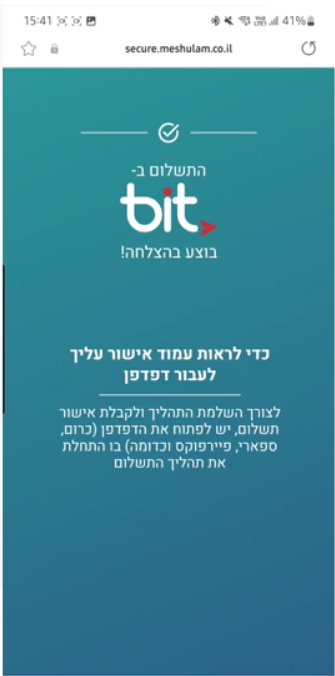
If the Bit payment flow was initiated from a non-default browser, such as Facebook, Instagram, or another in-app browser, the thank-you page may open in the device’s default browser instead of the browser where the payment started.
In this case, the customer will see an instruction page explaining that, in order to view the payment confirmation, they need to return to the browser where the payment process was originally started.
At this stage, the action depends on the customer. The customer may return to the original browser, switch back to the page where the payment started, or close this page.
3. Open in a New Tab
This option opens the thank-you page as a separate standalone page.
After the Bit payment is completed successfully, the thank-you page will open in the device’s default browser, regardless of the browser from which the payment process was initiated.
No additional instruction page will be displayed.
This option is suitable when the thank-you page does not need to return the customer to the original tab, original browser, or original page where the payment process started.
Recommendation
For the most stable user experience, we recommend using Open in a New Tab.
With this option, the thank-you page opens as a standalone page in the device’s default browser, regardless of the browser from which the payment process was initiated.
This prevents the customer from seeing additional instruction pages and removes the need for the customer to manually return to the original browser or original page.
As a result, the customer will always be able to view the thank-you page after completing the Bit payment successfully.
If the thank-you page does not need to retrieve data from the original tab or return the customer to the exact original page, this is the recommended redirect option.